1. Calculating apatite-melt exchange coefficients (Kd) and melt water concentration
pyAp contains a melt hygrometry model ApThermo, proposed in Li and Costa (2020, GCA) (see equations in pyApThermo.py).
This file shows how to calculate exchange coefficient (Kd) and melt water contents using our package. This package also allows error propagation that is not applicable from the webpage or excel version of ApThermo. Performing the hygrometric calculation requires known F, Cl (w or w/o H O concentrations in apatite, and F and Cl concentrations in the melt (see details below).
Please cite the paper below if you use this model:
Li, W. & Costa, F. (2020) A thermodynamic model for F-Cl-OH partitioning between apatite and melt including non-ideal mixing and applications to constraining melt volatile budgets, Geochimica et Cosmochimica Acta 269, 203–222. https://doi.org/10.1016/j.gca.2019.10.035
Import modules and data
import releavant modules.
[1]:
import pandas as pd, numpy as np, matplotlib.pyplot as plt, seaborn as sns

## use the 3 lines below if you want to use the pyAp codes inthe subdirectory next to the current path
## comment them, if you want to use the pyAp installed elsewhere on your computer
import os, sys
if not os.path.exists('pyAp') and os.path.exists('../pyAp'): # hack to allow scripts to be placed in subdirectories next to pyAp:
    sys.path.insert(1, os.path.abspath('..'))

## import pyAp modules
from pyAp import pyApthermo
from pyAp.pyAp_tools import ap_mc
Import data
!! Do NOT change the column header names in the template excel file (provided in the same folder).
!! Do NOT use same sample labels for different samples (as this will affect the MC sampling below for error estimation)
[2]:
df = pd.read_excel('data_calc_water.xlsx',sheet_name="Sheet2")
df
[2]:
| sample | XF | XCL | MELTF | MELTCL | MELTCOMP | T,C | XF_SD | XCL_SD | MELTF_SD | MELTCL_SD | T_SD | |
|---|---|---|---|---|---|---|---|---|---|---|---|---|
| 0 | Ap1c_1 | 0.400665 | 0.17206 | 600 | 2500 | Rhyolite | 950 | 0.01 | 0.01 | 100 | 100 | 20 |
| 1 | Ap1c_2 | 0.400665 | 0.17206 | 600 | 2500 | Dacite | 950 | 0.01 | 0.01 | 100 | 100 | 20 |
| 2 | Ap1c_3 | 0.400665 | 0.17206 | 600 | 2500 | Alkali Basalt | 950 | 0.01 | 0.01 | 100 | 100 | 20 |
Extract parameter values from the input file
[3]:
order  = ['XF', 'XCL', 'T,C', 'MELTF', 'MELTCL', 'MELTCOMP']
data = df[order]
Calculate HO in the melt using apatite
Water speciation models
Water speciation models available in this package are shown in “pyAp/water_speciation.csv” and also in pyApThermo.py, including:
dacite - Liu et al. 2004
alkali basalt - Lasne et al. 2010
rhyolite - Zhang et al. 1997
rhyolite_highP - Hui et al. 2008 (1 GPa)
andesite - Ni et al. 2009
andesite_highT - Botcharnikov 2006 (1100-1300 ºC)
Note that model names filled in the input file (under MELTCOMP) should be exactly the same as those listed above. For example, “dacite” needs NOT to be written as “Dacite”. When no model was input, the code would use the default one: dacite of Liu et al. (2004), DOI: 10.2138/am-2004-2-304
Additional water speciation models could be added to pyApThermo.py. If you would like to discuss on this with us feel free to email Alex (wl413@cam.ac.uk).
Calculation
You can use a Dataframe function apply() (see below) for iterations through each row of the input DataFrame. The data are assigned into class Apthermo for calculation.
When cal_H2O=True (default), there will be 8 values calculated for each crystal following the order of: MeltWater calculated from F and Cl, Kds for OH-Cl, OH-F, Cl-F, and activity coefficient (gamma) of OH, F, and Cl.
When cal_H2O=False, there will be 6 values calculated for each crystal (Kds and gammas).
[4]:
results = pd.DataFrame()
list_result = data.apply(
    lambda row: pyApthermo.ApThermo(inputs=row[order], cal_H2O=True,cal_gamma=False).meltH2O(),axis=1
    )
results['MeltWater_calcfromF']  = [x[0] for x in list_result]
results['MeltWater_calcfromCl'] = [x[1] for x in list_result]
results['sample']               = df['sample']
results['MeltComp']             = df['MELTCOMP']
results['Model_used']           = [x[-1] for x in list_result]
results
[4]:
| MeltWater_calcfromF | MeltWater_calcfromCl | sample | MeltComp | Model_used | |
|---|---|---|---|---|---|
| 0 | 3.043514 | 2.890552 | Ap1c_1 | Rhyolite | rhyolite |
| 1 | 3.047603 | 2.894301 | Ap1c_2 | Dacite | dacite |
| 2 | 4.296288 | 4.035510 | Ap1c_3 | Alkali Basalt | alkali basalt |
Save results (to csv file)
[5]:
fn = 'outputs_melt_water.csv'
pd.concat([df,results[['MeltWater_calcfromF','MeltWater_calcfromCl','Model_used']]],axis=1).to_csv(fn)
Error integration using a monte carlo (MC) algorithm
Below we show an example of estimating errors in the melt water estimates given errors in apatite composition, melt F-Cl contents, and temperature.
First, set the number of MC sampling (better to be no less than 5000)
[6]:
mc = 5000
Create a dataframe for storing parameter values and results from MC sampling
[7]:
ap_mc_collect = pd.DataFrame()
comp = df[['XF', 'XCL', 'T,C', 'MELTF', 'MELTCL']]
std = df[['XF_SD', 'XCL_SD', 'T_SD','MELTF_SD', 'MELTCL_SD']]
Use function ap_mc() to vectorize and store values to the created empty dataframe ap_mc_collect
[8]:
for idx in range(len(df)):
    df_iter = ap_mc(comp, std, idx, mc)
    ap_mc_collect = pd.concat([ap_mc_collect, df_iter])
Calculate melt water contents using MC samples and function meltH2O() in module pyApthermo.
Note that warnings.warn(msg, RuntimeWarning) may appear if the code cannot find good solutions to some equations (in most cases because the calculated mole OH in the melt is too high).
Considering this, in the module code we set the limit of the calculated melt water concentration to be between 0 and 15 wt% (given the range of HO in most silicate melts).
Running the cell below may take a few seconds, if mc is set as ≥10,000
[9]:
ap_mc_collect.columns = comp.columns
ap_mc_collect['MELTCOMP'] = df.loc[df.index.repeat(mc)]['MELTCOMP']
ap_mc_collect['water_estimates'] = ap_mc_collect.apply(
    lambda row: pyApthermo.ApThermo(inputs=row[order], cal_H2O=True,cal_gamma=False).meltH2O(),axis=1
    )
ap_mc_collect['sample'] = df.loc[df.index.repeat(mc)]['sample']
/Users/easonzz/miniforge3/lib/python3.9/site-packages/scipy/optimize/minpack.py:175: RuntimeWarning: The iteration is not making good progress, as measured by the
  improvement from the last ten iterations.
  warnings.warn(msg, RuntimeWarning)
[10]:
results_mc = pd.DataFrame()
results_mc['MeltWater_calcfromF'] = [x[0] for x in ap_mc_collect['water_estimates']]   ## only take melt water estimates between 0 and 16wt%
results_mc['MeltWater_calcfromCl'] = [x[1] for x in ap_mc_collect['water_estimates']]  ## only take melt water estimates between 0 and 16wt%
results_mc['sample'] = ap_mc_collect.reset_index()['sample']
Drop mc results that are equal to NaN (this may occur when water speciation conversion has no solution)
[11]:
results_mc=results_mc.dropna()
Calculate mean values and uncertainties
Calculate and show the mean and standard deviation of the melt water estimates. The median values can also be shown by adding “median” to .agg([]) below.
[12]:
res = results_mc.groupby('sample').agg(['mean', 'median'])
Calculate standard deviation (half the range between 84% and 16% of all results). This is should be done if the distribution of the MC results are not Gaussian (see code below).
[13]:
sd_F = results_mc.groupby('sample')['MeltWater_calcfromF'].transform(lambda s: (np.percentile(s, 84)-np.percentile(s, 16))/2).unique()
sd_Cl = results_mc.groupby('sample')['MeltWater_calcfromCl'].transform(lambda s: (np.percentile(s, 84)-np.percentile(s, 16))/2).unique()
Store results in DataFrame results_water
results_water: values in the leftmost two columns were calculated without considering any errors (see above), whereas the rest were calculated using the MC algorithm.
Note that the mean values calculated from the two methods mentioned above should be identical.
[14]:
results_water=pd.DataFrame()
results_water['MeltWater_Fmean']   =  [x for x in res["MeltWater_calcfromF"]["mean"]]
results_water['MeltWater_Fmedian']   =  [x for x in res["MeltWater_calcfromF"]["median"]]
results_water['MeltWater_F1sd']  = [x for x in sd_F]

results_water['MeltWater_Clmean']  = [x for x in res["MeltWater_calcfromCl"]["mean"]]
results_water['MeltWater_Clmedian']  = [x for x in res["MeltWater_calcfromCl"]["median"]]
results_water['MeltWater_Cl1sd'] = [x for x in sd_Cl]

results_water
[14]:
| MeltWater_Fmean | MeltWater_Fmedian | MeltWater_F1sd | MeltWater_Clmean | MeltWater_Clmedian | MeltWater_Cl1sd | |
|---|---|---|---|---|---|---|
| 0 | 3.166346 | 2.993317 | 0.945725 | 2.945379 | 2.872579 | 0.559442 |
| 1 | 3.180393 | 3.024545 | 0.922065 | 2.947250 | 2.873353 | 0.551339 |
| 2 | 4.586823 | 4.234425 | 1.668070 | 4.186104 | 4.040759 | 0.953175 |
combine with results calculated above that does not consider uncertainties
[15]:
df_comb=pd.concat([results,results_water],axis=1)
df_comb
[15]:
| MeltWater_calcfromF | MeltWater_calcfromCl | sample | MeltComp | Model_used | MeltWater_Fmean | MeltWater_Fmedian | MeltWater_F1sd | MeltWater_Clmean | MeltWater_Clmedian | MeltWater_Cl1sd | |
|---|---|---|---|---|---|---|---|---|---|---|---|
| 0 | 3.043514 | 2.890552 | Ap1c_1 | Rhyolite | rhyolite | 3.166346 | 2.993317 | 0.945725 | 2.945379 | 2.872579 | 0.559442 |
| 1 | 3.047603 | 2.894301 | Ap1c_2 | Dacite | dacite | 3.180393 | 3.024545 | 0.922065 | 2.947250 | 2.873353 | 0.551339 |
| 2 | 4.296288 | 4.035510 | Ap1c_3 | Alkali Basalt | alkali basalt | 4.586823 | 4.234425 | 1.668070 | 4.186104 | 4.040759 | 0.953175 |
Visualize results obtained from MC sampling, and compare with results without uncertainty considered
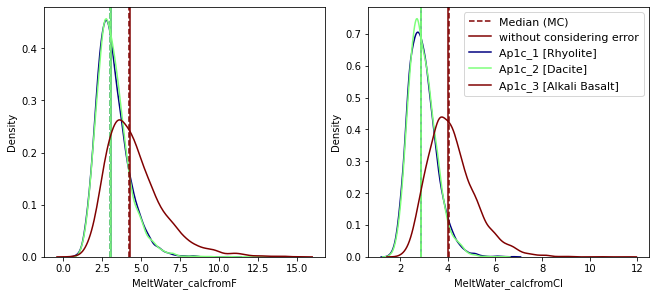
The median of values from MC sampling, and the value calculated without considering errors, should be identical (plotted as vertical lines).
If not, increase the number of mc sampling (mc) from cells above.
[16]:
from mycolorpy import colorlist as mcp
colors=mcp.gen_color(cmap='jet',n=len(df_comb))

fig, axes = plt.subplots(1, 2, figsize=(9,4), constrained_layout=True)

for i in range(len(df_comb)):
    sample=df_comb['sample'][i]
    unc=results_mc[results_mc['sample']==sample]

    ## plot the median of MC results (considering uncertainty), and the value without considering uncertainty
    axes[0].axvline(x=df_comb["MeltWater_Fmedian"][i], c= colors[i], ls='--')
    axes[0].axvline(x=df_comb["MeltWater_calcfromF"][i], c= colors[i], ls='-')
    axes[1].axvline(x=df_comb["MeltWater_Clmedian"][i],  c= colors[i], ls='--',label='Median (MC)')
    axes[1].axvline(x=df_comb["MeltWater_calcfromCl"][i], c= colors[i], ls='-',label='without considering error')

    ## plot the distribution of MC results
    sns.kdeplot(unc['MeltWater_calcfromF'], c= colors[i],  ax = axes[0])
    sns.kdeplot(unc['MeltWater_calcfromCl'],c= colors[i], label=sample+' ['+df_comb['MeltComp'][i]+']', ax = axes[1])

handles, labels = plt.gca().get_legend_handles_labels()
by_label = dict(zip(labels, handles))
plt.legend(by_label.values(), by_label.keys(),ncol=1,fontsize=11,loc='best')
plt.show()
[17]:
df_all=pd.concat([df,df_comb],axis=1)
df_all=df_all.loc[:,~df_all.columns.duplicated()]
df_all=df_all.drop(columns=["MeltComp"])
[18]:
df_all
[18]:
| sample | XF | XCL | MELTF | MELTCL | MELTCOMP | T,C | XF_SD | XCL_SD | MELTF_SD | ... | T_SD | MeltWater_calcfromF | MeltWater_calcfromCl | Model_used | MeltWater_Fmean | MeltWater_Fmedian | MeltWater_F1sd | MeltWater_Clmean | MeltWater_Clmedian | MeltWater_Cl1sd | |
|---|---|---|---|---|---|---|---|---|---|---|---|---|---|---|---|---|---|---|---|---|---|
| 0 | Ap1c_1 | 0.400665 | 0.17206 | 600 | 2500 | Rhyolite | 950 | 0.01 | 0.01 | 100 | ... | 20 | 3.043514 | 2.890552 | rhyolite | 3.166346 | 2.993317 | 0.945725 | 2.945379 | 2.872579 | 0.559442 |
| 1 | Ap1c_2 | 0.400665 | 0.17206 | 600 | 2500 | Dacite | 950 | 0.01 | 0.01 | 100 | ... | 20 | 3.047603 | 2.894301 | dacite | 3.180393 | 3.024545 | 0.922065 | 2.947250 | 2.873353 | 0.551339 |
| 2 | Ap1c_3 | 0.400665 | 0.17206 | 600 | 2500 | Alkali Basalt | 950 | 0.01 | 0.01 | 100 | ... | 20 | 4.296288 | 4.035510 | alkali basalt | 4.586823 | 4.234425 | 1.668070 | 4.186104 | 4.040759 | 0.953175 |
3 rows × 21 columns
[19]:
df_all.to_csv("outputs_melt_water_error.csv")